# How to Insert Picture?
- Place the cursor where you want to insert picture.
- Click on insert menu.
- Click on picture.
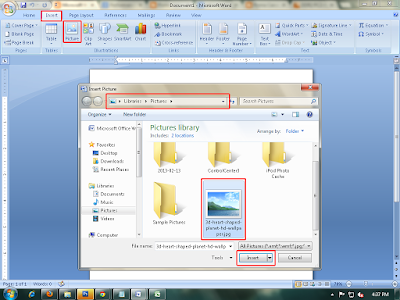 |
| Insert picture |
- Defined required picture in the computer and choose picture.
- Click on insert.
# How to apply picture style?
- Select the picture.
- Click on format menu.
- Click on drop down arrow of picture style and choose required one style.
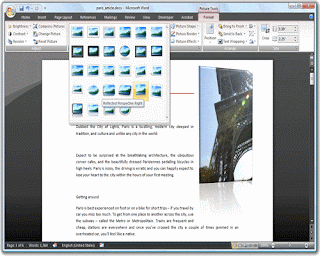 |
| picture style |
# How to text wrapping picture?
- Select the picture.
- Click on format menu.
- Click on text wrapping and choose required one option. Eg. In front of text behind of text.
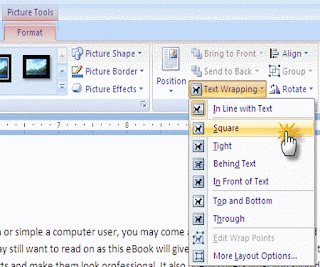 |
| Text wrapping |
# How to change picture shape?
- Select the picture.
- Click on format menu.
- Click on picture shape and choose required picture shape style.
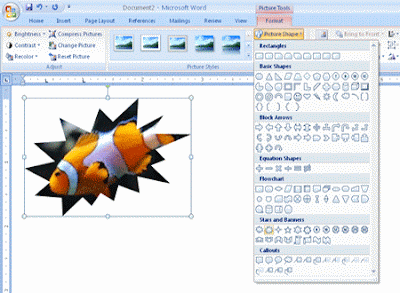 |
| Change picture shape |
# How to Re-color picture?
- Select the picture.
- Click on format menu.
- Click on position and choose required one.
- Eg. Top and left
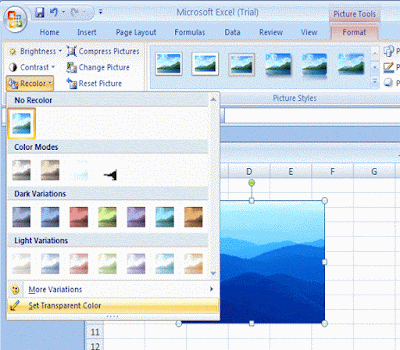 |
| Re-color |
#
How to change picture position in the page?
- Select the picture.
- Click on format menu.
- Click on position and choose required one. Eg. top and left.
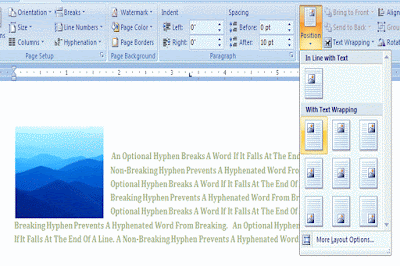 |
| Change Picture position |


